About Typing Tutor(V5.0)

Typing Tutor (V5.0) is a professional desktop-based typing software developed by Webunitech Solutions LLP for typing institutes, educational organizations, and competitive exam training centers.

The software includes dedicated Admin and Student panels, supporting English Typing, Hindi Typing , Stenography, and Government Exam Typing Tests. With lesson-based learning, typing practice, performance tracking, instant evaluation, and comprehensive reports, it provides everything needed to manage typing education and examinations from a single platform.

3000/- Off
60000One Time
  • English, Hindi Typing
  • Stenography Typing
  • Government Exam Typing Tests
  • Lesson-Based Learning
  • Powerful Admin Dashboard
  • Student Login & Progress Tracking
  • Auto Evaluation & Instant Results
  • Speed, Accuracy & Performance Reports
  • Test & User Management

Key Features:

Student Registration & Login
Register students with ease and provide secure login access to their personalized dashboard for learning, practice, and examinations.
Manage your institute efficiently with a dedicated Admin Panel, while students can access lessons, practice sessions, typing tests, and progress through a separate Student Panel.
Offer structured typing lessons for English, Hindi (Kruti Dev & Unicode), and Stenography, helping students build speed and accuracy step by step.
Create, configure, and manage typing tests based on SSC, CPCT, RSMSSB, High Court, Banking, Police, and other government examination patterns.
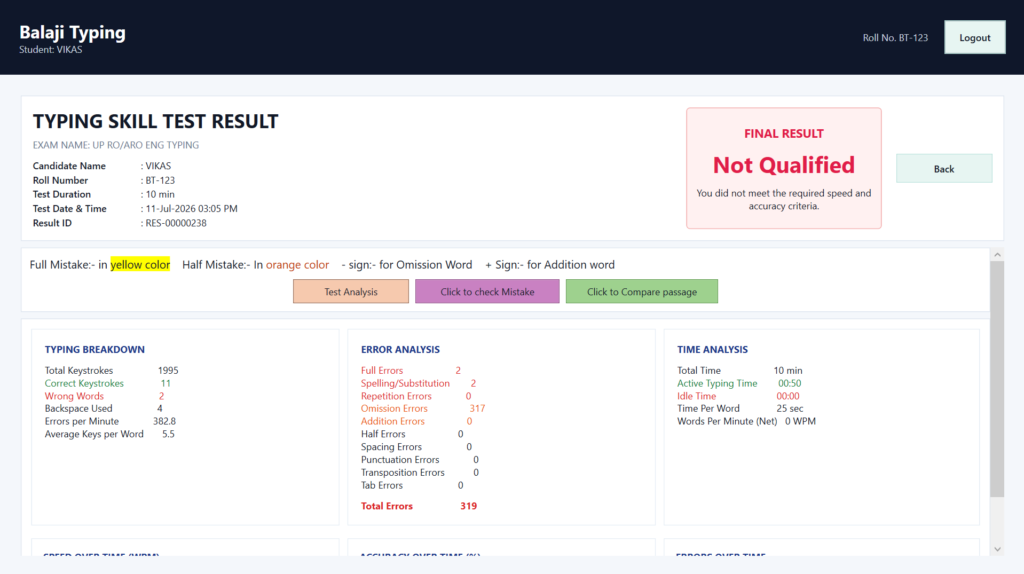
Track WPM (Words Per Minute), typing accuracy, mistakes, backspaces, and overall performance instantly after every practice session or test.
Generate detailed reports with typing speed, accuracy, progress history, rankings, and performance analytics to evaluate every student's improvement.
Automatically generate test results and certificates while maintaining complete student performance records for future reference.

HOW TO USE (Windows Based)

Step 1 — Login to Your Account

Students can securely log in using their assigned Roll No. access their personalized dashboard.

Step 2 — Select a Typing Course

Choose from English Typing, Hindi Typing, or Stenography based on your learning requirements or examination preparation.

Step 3 — Start Typing Lessons

Practice structured typing lessons designed to improve keyboard familiarity, finger placement, typing speed, and accuracy step by step.

Step 4 — Attempt Typing Tests

Take typing tests based on SSC, CPCT, RSMSSB, High Court, Banking, Police, and other government examination patterns.

Step 5 — View Live Performance

Monitor your typing speed (WPM), accuracy, mistakes, backspaces, and completion time instantly after every practice session or examination.

Step 6 — Review Results & Progress

Access detailed reports to analyze your performance, identify mistakes, and monitor your overall improvement over time.

Step 7 — Download Results & Certificates

View, print, or download your typing results and certificates whenever required.

1 Why Choose Us?

  • Separate Admin and Student Panels
  • User-Friendly Desktop Interface
  • Complete Typing Institute Management
  • Lesson & Test Management
  • Detailed Performance Reports
  • Speed & Accuracy Tracking
  • Certificate & Result Management
  • Secure Desktop Application
  • Regular Software Updates
  • Reliable Technical Support

2 What comes in Item support ??

Your purchase includes:

  • Software installation guidance
  • Product activation assistance
  • Technical support
  • Bug fixes
  • Software updates
  • Documentation
  • User manual
  • Email support

Custom development and additional feature requests are available separately.

3 For Support,Quries, Doubts, suggessions …

Our technical support team is available to assist you with installation, activation, configuration, and troubleshooting.

Email: support@webunitech.com

Sales: sales@webunitech.com

Phone: +91-958-850-0864